R36H Accessories Worth Buying
The R36H needs very little. Its weakest part is the bundled microSD card, so a good card comes first. After that, a case and screen protector sized for the R36H are the only add-ons most owners need. Below is what to buy, what fits, and what to skip.
Priority order
1. A quality microSD card. 2. A card reader, if your computer lacks one. 3. A case. 4. A screen protector. Optional: a USB-A charger and cable, a power bank for travel, a WiFi dongle and wired earbuds. The console itself needs nothing else to play.
Jump to: microSD cards · card reader · cases · screen protectors · grip · charging and power · WiFi · headphones · care · Pro Max · what to skip

Video: our channel, @r36shandheld. Shown with R36S accessories; the categories are the same for the R36H, but buy cases and screen protectors sold for the R36H.
1. A Quality microSD Card
Owners most often report problems with the bundled card, not the console. Copy it to a card from a major brand before you rely on it. The R36H has two slots: the system card goes in TF1-OS, and an optional games card goes in TF2-GAME. For 8-bit to PlayStation libraries, 64GB to 128GB is plenty. See the SD card setup guide for cloning and formatting.

SanDisk Ultra 128GB microSD
A mainstream card from a major brand. 128GB leaves room for large PS1 collections on the TF2-GAME slot.
Check Price →
Samsung EVO Select 128GB microSD
A U3-rated alternative from another major brand, supplied with an SD adapter.
Check Price →
SanDisk Ultra 256GB microSD
Same card line in 256GB, for large PlayStation or PSP collections on the TF2-GAME slot. Only worth it if your library really needs the room.
Check Price →2. A microSD Card Reader
You need one to back up the stock card, clone it, or write a new firmware image. Many laptops no longer have a card slot.

SanDisk MobileMate USB 3.0 Reader
A compact USB-A reader for microSD cards. Use it for backups and for writing firmware images.
Check Price →3. A Case
Every listing below names the R36H. Fit is the seller's claim, so check the listing's photos against your unit. A hard case protects the screen and sticks in a bag, while a silicone sleeve adds grip and bump protection during play.

YAJOJO Hard Carrying Case
Hard-shell travel case listed for the R36H, with a wrist strap and carabiner.
Check Price →
NOUKAJU Silicone Case
Soft silicone cover listed as compatible with the R36H, with cut-outs for the controls.
Check Price →
R36H Carrying Case with Accessory Storage
A hard case listed for the R36H with an organised interior for cables and spare cards.
Check Price →
Silicone Case with Lanyard (R36H)
A soft cover listed for the R36H that adds a wrist lanyard, useful for kids or commuting.
Check Price →4. A Screen Protector
The R36H has a 3.5-inch 640×480 screen. Buy a protector sold for the R36H, not the R36S or the larger Pro Max.
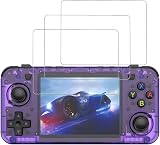
BOVUGAC Tempered Glass (R36H)
A three-pack of tempered glass protectors listed for the R36H, including Boyhom-branded units.
Check Price →4b. Optional: Ergonomic Grip
The R36H is flat and light, which some adults find cramped in long sessions. A clip-on grip adds depth behind the shoulder buttons. Only one grip on Amazon names the R36H; it will not fit inside a hard case while attached.

Ergonomic Grip (R36H)
A clip-on grip listed as compatible with the R36H, with extended side grips for larger hands.
Check Price →5. Charging and Power
For charging, Tech Tactician measured a 5V/1.5A USB-C input. Any standard USB charger that supplies 5V works, so you do not need a special charger. If your unit does not start charging from a USB-C to USB-C charger, which happens with some budget handhelds, a USB-A charger with a USB-A to USB-C cable avoids the problem.

Amazon Basics 12W USB-A Charger
A plain 5V USB-A wall charger, sold as a two-pack. Pair it with a USB-A to USB-C cable.
Check Price →

Anker 10,000mAh Power Bank
Has a USB-A port as well as USB-C, so the same USB-A to USB-C cable charges the R36H on the go.
Check Price →Replacement batteries
We do not link replacement batteries, because listings rarely match the R36H exactly. TheSixthAxis found a removable 3000mAh, 3.7V cell in the 504575 size with a 2-pin JST connector. Batteries sold “for R36S” are often a different size, so compare the dimensions and the connector's polarity before buying. See R36H battery life and replacement.
6. Optional: WiFi Dongle and OTG Adapter
The standard R36H has no WiFi. On ArkOS you can add it with a small USB dongle and an OTG adapter, as our R36H WiFi guide explains. The chip matters more than the brand: pick a dongle whose listing names a Realtek RTL8188EU(S) chip. It is optional: you only need WiFi for network features such as scraping box art or copying files over the network.

Edimax EW-7811Un V2
A nano USB dongle whose listing names the RTL8188EUS chip, the family the WiFi guide's sources report as usually working on ArkOS.
Check Price →
Amazon Basics USB-C to USB-A Adapter
Turns the R36H's USB-C OTG port into a full-size USB-A socket for the dongle.
Check Price →7. Headphones
The R36H has a 3.5 mm headphone jack next to its two USB-C ports (Tech Tactician's port list), and no Bluetooth, so any wired earbuds with a 3.5 mm plug work. Nothing special is needed: a basic pair is fine for 8-bit and 16-bit soundtracks.

Panasonic ErgoFit Wired Earbuds
Basic wired in-ear earbuds with a 3.5 mm plug and three ear-tip sizes. Nothing to pair or charge.
Check Price →8. Care
A transparent shell shows dust and fingerprints quickly. A dry microfiber cloth keeps the screen and shell clean without scratching the plastic; skip alcohol wipes on the screen protector.

MagicFiber Microfiber Cloths
A six-pack of microfiber cloths for the screen and shell. One in the case, one at home.
Check Price →R36H Pro Max Owners
The R36H Pro Max has a bigger 4.2-inch screen and a larger body, so R36H cases and protectors will not fit. Use accessories listed for the Pro Max.

BOVUGAC Screen Film (Pro Max)
A flexible TPU film two-pack listed for the R36H Pro Max. Note it is film, not tempered glass.
Check Price →
Hard EVA Case (Pro Max)
A hard EVA carrying case listed for the R36H Pro Max, with a mesh pocket for cables and cards.
Check Price →What to Skip
- HDMI or USB-C video adapters: the R36H has no video output, so they will not work.
- Bluetooth controllers: most R36H units have no Bluetooth. USB controllers through the OTG port depend on your firmware's support.
- Thumb grips sold for the R36S: we found no thumb-grip listing that names the R36H, so fit on its sticks is unproven. Skip them unless a listing names your console.
- Large or unbranded “game-loaded” cards: capacity does not fix a low-quality card. A reliable 128GB card beats a doubtful 512GB one.